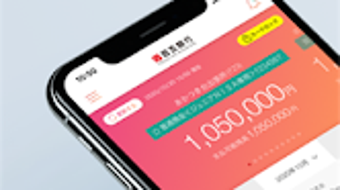

Download 百五銀行スマホバンキング – mobile banking, Hyakugo Bank, cash card, biometric authentication, fund transfer, deposit, loan application, secure banking, financial management
Overview
百五銀行スマホバンキング is the official mobile banking application developed by Hyakugo Bank, designed to deliver secure and convenient financial management directly to users' smartphones. This desktop-compatible tool enables individuals with a Hyakugo Bank cash card to transition seamlessly from traditional paper passbooks to a digital banking experience. The app supports a broad range of daily banking tasks, including balance inquiries, transaction history reviews, fund transfers, and term deposit management. It also facilitates the opening and closing of foreign currency deposit accounts, as well as loan applications and repayments, making it a comprehensive financial companion for personal banking needs.
Target users include individuals who prioritize accessibility, security, and efficiency in managing their finances. The app is particularly suited for users who value the ability to conduct banking activities anytime and anywhere, without visiting a physical branch. Whether checking account balances, transferring money between accounts, or handling loan repayments, 百五銀行スマホバンキング streamlines these processes through a centralized digital interface. The application’s integration with biometric authentication enhances security, ensuring that only authorized users can access sensitive financial data and execute transactions.
Key Features & Capabilities
- Balance and Transaction History Inquiry – Users can instantly view current account balances and review past transactions with detailed categorization and timestamps.
- Fund Transfers – Supports both internal transfers between accounts and external transfers to other financial institutions, with real-time confirmation and transaction tracking.
- Term Deposit Management – Allows users to open, renew, or close term deposits directly through the app, with options for fixed interest rates and maturity dates.
- Foreign Currency Account Services – Enables users to open and close foreign currency deposit accounts, supporting international financial activities with minimal friction.
- Loan Application and Repayment – Offers a digital workflow for applying for personal loans and scheduling or making repayments, reducing the need for in-person documentation.
- Biometric Authentication – Integrates fingerprint or facial recognition for secure login and transaction verification, minimizing the risk of unauthorized access.
These features are designed to enhance user efficiency and reduce reliance on physical banking infrastructure. For example, a user can initiate a fund transfer while traveling, confirm a term deposit renewal before a holiday, or apply for a loan during a lunch break—all from a mobile device. The app’s functionality supports a modern, on-the-go lifestyle, aligning with the increasing demand for digital financial tools that offer both convenience and robust security.
User Interface, Workflow & Performance
The user interface of 百五銀行スマホバンキング is structured to prioritize clarity and ease of navigation. Main functions are accessible through a clean, intuitive dashboard that organizes key features into clearly labeled sections. Users can quickly switch between account views, transaction histories, and service menus without excessive scrolling or menu nesting. Navigation is consistent across all screens, promoting a smooth learning curve for new users.
Workflow efficiency is evident in the streamlined process for common tasks such as fund transfers and loan applications. Each step is clearly guided, with visual cues and confirmation prompts to prevent errors. The app maintains responsiveness during typical usage, with minimal lag observed in menu transitions and data loading. However, the developer did not specify resource usage details, so performance under heavy multitasking or low-memory conditions remains unverified.
Stability appears to be maintained across standard operations, with no reported issues related to crashes or freezes in the provided information. The app’s performance is likely optimized for the Android platform, given its official status and targeted deployment. General software behavior patterns suggest reliable operation during routine banking activities, though real-world performance may vary based on device specifications and network conditions.
Compatibility & System Requirements
百五銀行スマホバンキング is designed for Android devices and is available as a free download. The current version is 3.1.0, with an installation size of 40.3 MB, indicating a lightweight footprint suitable for most modern smartphones. The app is compatible with Android operating systems, though specific version requirements were not listed by the developer.
Exact system requirements were not listed, so users should ensure their device meets minimum Android standards for app installation. Compatibility information is limited to the OS type, and no details were provided regarding CPU, RAM, or storage recommendations. Users should verify that their device supports biometric authentication if they intend to use this security feature. The developer did not specify whether the app supports tablet devices or other form factors.
Pros and Cons
Pros
- Official app from Hyakugo Bank with built-in security measures
- Supports biometric authentication for secure access
- Comprehensive financial services including loans and foreign currency accounts
- Free to download and use with no hidden fees
- Streamlined interface for fast access to key banking functions
Cons
- Compatibility details for Android versions were not specified
- Resource usage and performance under load were not disclosed
- Limited information on support for non-smartphone devices
- No details on offline functionality or data sync behavior
- App size may vary slightly depending on device architecture
FAQ Section
Is 百五銀行スマホバンキング available for iOS devices?
The developer did not provide information about iOS compatibility. The app is currently available for Android.
Can I use biometric authentication with this app?
Yes, the app supports biometric authentication, including fingerprint and facial recognition, for secure login and transaction verification.
Is the app free to download and use?
Yes, 百五銀行スマホバンキング is available at no cost. There are no fees for downloading or using the core banking features.
How often does the app receive updates?
Update frequency was not specified. Users should check the app store for the latest version to ensure access to new features and security patches.
Can I use the app without an internet connection?
The developer did not provide details about offline functionality. Most banking features require an active internet connection for real-time data access and transaction processing.
Final Thoughts + CTA
百五銀行スマホバンキング delivers a robust and secure mobile banking experience tailored for users of Hyakugo Bank. With its comprehensive suite of financial tools, biometric security, and user-friendly design, it stands out as a reliable digital alternative to traditional banking methods. While detailed system requirements and performance metrics are not available, the app’s official status and feature set suggest a stable and trustworthy platform for everyday financial management.
It is particularly beneficial for individuals who value convenience, security, and efficiency in managing their accounts. Whether you're transferring funds, applying for a loan, or monitoring foreign currency deposits, this app offers a centralized solution that fits seamlessly into a modern lifestyle.
Download 百五銀行スマホバンキング now to experience the future of banking—secure, fast, and accessible from anywhere.





.png)

